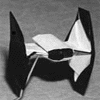

- Why can't I make the TIE interceptor right?
- How do you do this origami?
- Why are the diagrams so inconsistant?
- How can I change the display or accessibility options?
- Can you make XXXX next? Will you diagram the YYYY?
- How did you come up with your origami?
- What are you, some kind of Star Wars freak?
- What is the answer to Life, the Universe, and Everything?
- Why can't I make the TIE interceptor right?
-
There's a flaw in the TIE Interceptor v2 that has tricked a lot of people. I redesigned version 3 with a different folding pattern and accurate color changed wings. Please give it a try and let me know if it is better.
Back to v2:
I'm betting you're stuck at step 14. Am I right? It's 14, isn't it.
Well, it isn't. I left something out. Go back to 12. You're right at the part where the model becomes 3-D, which is always a pain to draw, so I can understand if my drawings aren't clear enough.
Broken down: The Colored Center of the cockpit is facing up.*__________ A / Some visual aids. . . ________/ B,C1. Inside Reverse Fold Points A down.*___ \ ____\ B,C | / |/ A2. Open the end, so point B is folded towards you, sticking right out of the page, and C is away from you, pointing at the back of your monitor. It's now a three dimensional T shape (H if you did it to the Left end of the paper too.)*____ /\ _B/ \ C \ / \/ A3. Now in step 13, I cheated, and rotated the model without telling you. The color changed center is no longer on top. It's pointed to the left. The diamond shape shown there is the wing we just opened. Points A are now to the right, C is up, and B is down. The body of the ship SHOULD be pointing toward the back of your monitor, but I got clever and was trying to draw a 3-D perspective type thing.C /\ *>-< >A \/ B4. To be honest, step 14 is just a modified petal fold (like the one used to make the crane)
Goto Top
- How do you do this origami?
-
'It's always best to begin at the beginning.' Be sure to look at the Basics page for some hints. Unfortunately, Dr. O'Hanlon's excellent tutorial is often over-bandwidth. Try it during the beginning of the month.
As I am a horrible teacher, I will once again send you elsewhere: Excellent Origami sites.
Goto Top
- Why are the diagrams so inconsistant?
-
I've been doing this for about 10 years now(!), so my diagramming style and my tools has changed a bit.
Originally I drew all of my steps in columns, which is not common. In 2003, I switched to a horizontal row like normal people. I haven't retroactively changed all the old ones unless there's a major change or error fix. As the designs grew more complex, I've started trying progressive crease patterns as a way to speed up diagramming. In my latest diagram, I played with colored creases because the line patterns are so hard to see when tiny. (Can you find which one?)
Major design changes are labelled as new Version integers. I've kept the older versions just for comparisons and continuity. Error fixes and changes to diagramming layout are considered a 0.1 upgrade and completely replace the older version.
Way back in Nineteen-Dickety, we had GIFs and we liked it. Web browsers never seemed to print the full screen, so I made multiple sizes for the GIFs. I was untaught in the ways of anti-aliasing.
Then PDFs emerged as the answer to all my problems. I tried several free PDF converters, but they all had new problems. Even now, my program doesn't convert the font and text perfectly, and it randomly crashes when converting. Let me know if errors creep in. I've converted many diagrams to PDF, so they should display better than GIFs. You can still toggle between two sizes of GIFs for some of the diagrams. They should all be the same version.
Goto Top
- How can I change the display or accessibility options?
- In redoing the site, I've tried to incorporate CSS and some accessibility options. Clicking Display Options will allow you to change Style sheets. Limited now, but I'd like to add more in time. The 'No style' option may be best for small screens. (I don't have an iPhone to test on - anyone care to donate?) You can reveal or hide Navigation tabs to help those who don't have mouse or touch screen controls. If there are other errors or problems, please feel free to complain. It'll probably make you feel better, and I might actually get around to fixing the problem. Goto Top
- Can you make XXXX next? Will you diagram the YYYY?
- Ummm, don't hold your breath. My free time is slowly diminishing, and hobbies should be a least a little fun. Designing new models can sometimes be very seridipitous, but usually it's a slow process. Diagramming is even more tedious. I do love to show off in this sea of anonymity, so I'll get around to it eventually. Why not check the links and find some new models available online, right at this very second? Goto Top
- How did you come up with your origami?
-
Couple of books influenced me in the beginning:Origami Omnibus by Kunihiko Kasahara, and Origami from Angelfish to Zen by Peter Engel. They both do more then just show you diagrams. They give puzzles, and challenge you to think about the theory and math behind it. It inspired me to start looking for shapes in the paper, like a whittler will 'bring out the shape within' from a piece of wood.
For the serious folder, I can recommend Origami Design Secrets, by Robert Lang. It's very insightful in how to create new models as well as adding details to and modularizing existing designs.My earliest design, the X-wing, flowed almost immediately from the frog base, and so I stuck with that theme. Basically, I had a three month burst of frenetic creativity, discovering many designs. Since then, I still create new models, but it is much more sedate process.
Goto Top
- What are you, some kind of Star Wars freak?
- I wanted to start this answer with that quote where an Imperial officer is insulting
Darth Vader by mocking him as some pathetic practitioner of an ancient religion, at which
point Vader calmly responds by choking the living crap out of him. That would have been
a perfect answer, but I'm too lazy to go find the quote. oh wait
So, in a way, that answers the question: Yes, I have obsessed over Star Wars, but no, not to the freaky level of being able to shoot off any quotes that I please.
I like science fiction and there's a lot of easily recognizable spaceships and aliens to work with. It's a niche appeal that has served me well. Do you have any idea how many origami elephants there are?
Goto Top
- What is the answer to Life, the Universe, and Everything?
42.
"I think the problem, to be quite honest with you, is that you've never actually known what the question is."
Goto Top
 Origami designs and diagrams by Philip Schulz are licensed under a Creative Commons Attribution-NonCommercial-ShareAlike 3.0 Unported License